
Every time I talk to new bloggers who are trying to grow their traffic and income, this question comes up almost immediately.
Usually it starts with something like:
“Why isn’t my Pinterest account growing?”
And it’s not like one email subscriber or blogger…it’s everyone (including me at times!).
I mean, I bet you’re probably doing all the things you’re supposed to be doing like:
- pinning consistently
- testing different pin designs
- watching what other bloggers are doing and trying to stay active
But somehow your traffic still feels stuck.
I remember going through this too.
I’d refresh my Pinterest analytics constantly waiting to see a spike in impressions or clicks.
And every time nothing happened, I assumed my niche was the problem or my pin designs just weren’t good enough.
But most of the time, that’s not actually the issue.
A lot of mom bloggers completely overlook one of the biggest pieces of Pinterest growth in 2026:
Your Pinterest profile.
Your profile tells Pinterest what your account is about, who your content is for, and where your pins belong on the platform.
So when your profile feels random, unclear, or all over the place, Pinterest struggles to understand your content too.
And when Pinterest gets confused, your pins usually stop getting pushed.
So in this post, I want to show you exactly how I’d set up a Pinterest profile in 2026 if I wanted more traffic, better reach, and faster account growth.
Why Your Profile Is the First Thing to Fix
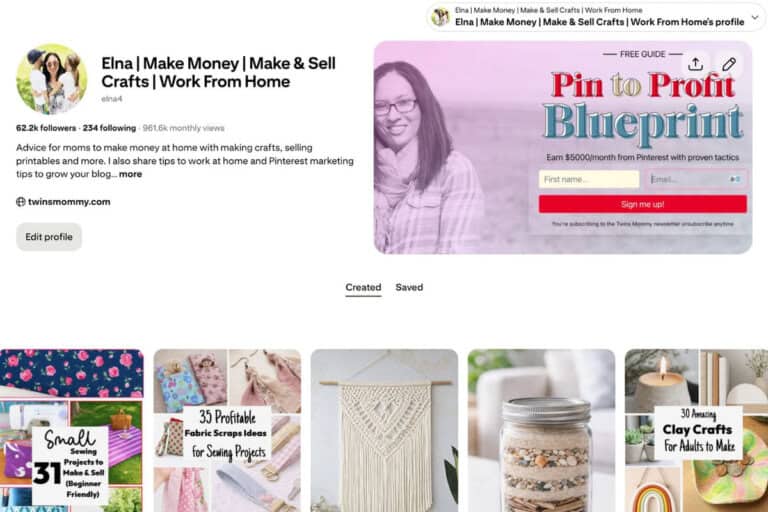
Your Pinterest profile is what tells Pinterest what your content is about, who it’s for, and where your pins belong on the platform.
So when your profile feels unclear or disconnected, Pinterest has a much harder time understanding your account too.
And once Pinterest gets confused, your growth usually slows down with it.
This typically happens the most with new Pinterest users. You are brand new to the platform and you need to TRAIN Pinterest on what you share and blog about.
When you have an optimized Pinterest profile, your pins reach more relevant people, your traffic grows more consistently, and your blog will start making money!
So, if you aren’t seeing traffic, try one of these profile tips and start seeing traffic today!
1. Start With a Clear Niche (Even If You Blog About Multiple Topics)
If you are a lifestyle blogger, it’s scary niching down, right?
You might be writing about recipes, crafts, mom life, and home organization. That’s normal.
I do the same on some of my niche sites (i.e. you will see my latest lifestyle blog in my updated Pin & Win Pinterest Marketing Program)
But your Pinterest profile still needs one clear anchor.
When I look at your profile, I should instantly understand what your content is about. More importantly, Pinterest should understand it too.
Instead of trying to cover everything equally, choose one main direction.
For example:
- Easy recipes and home tips for busy moms
- Mom life, crafts, and organizing ideas
- Work-from-home tips for moms building online income
You’re not limiting yourself. You’re giving Pinterest a starting point.
And once Pinterest understands that, it becomes much easier for your pins to reach the right people.
If you still can’t narrow down your niche topics, try narrowing down your audience.
Instead of ALL moms, focus on moms with little kids.
Instead of pregnant moms, focus on FIRST-TIME pregnant moms.
See what I’m doing?
I’m picking an audience to write to and this is what I did for Twins Mommy. I could have narrowed down to ONLY blogging for moms who also have twins, but I decided to widen my audience to include any mom with little kids.
So becarful about narrowing down TOO much!
2. Use a Real Photo and a Keyword-Friendly Name
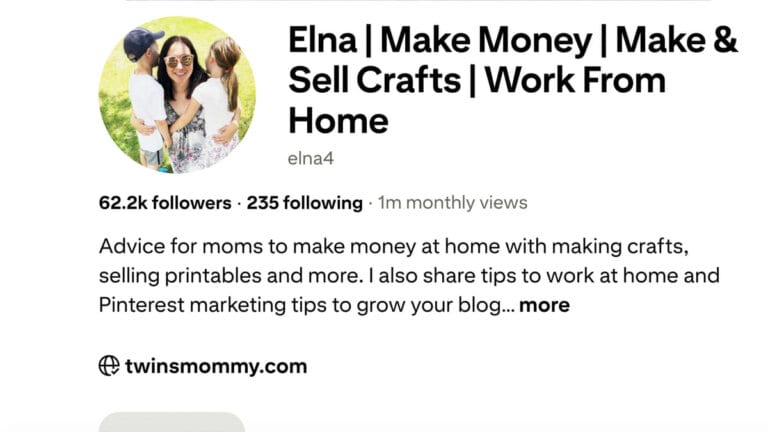
This is one of those small changes that makes a big difference.
I know it’s tempting to use a logo or a cute graphic or even an AI avatar. I used to think it made my brand look more polished.
But in 2026, a real photo works better.
Pinterest is leaning more into real creators. A clear, friendly photo helps your profile feel trustworthy and human.
When someone lands on your profile, they should feel like they’re following a real person, not a brand account.
I recently had to use a real photo instead of an AI version for one of my niche Pinterest profiles because traffic was dipping. Once it changed, I noticed a small change which told me I was going in the right direction.
For your name, keep it simple but strategic.
If you’re just starting out:
- Use your name + blog name
Example: Elna | Twinsmommy
If you’re more established or want to lean into keywords:
- Add what you help people with
Example: Elna | Make Money from Home
You’re helping Pinterest connect your profile to search terms right away.
3. Write a Bio That Helps Pinterest Understand You
Your bio isn’t just for readers.
It’s for Pinterest.
This is where you tell Pinterest exactly what your content covers.
When I write my bio, I think about the main topics I want to rank for and then I write it in a way that still feels natural.
Here’s what mine says:
Advice for moms to make money at home with making crafts, selling printables and more. I also share tips to work at home and Pinterest marketing tips to grow your blog and business. Get my free Pin to Profit Blueprint @ twinsmommy.com
You don’t need to sound robotic. You just need to be clear.
Here’s an example style you can follow:
Advice for moms who want to make money at home. I share tips on blogging, Pinterest marketing, crafts, and selling printables. Grab my free blueprint to grow your traffic.
This tells Pinterest, my profile is for moms who are have a blog and work from home.
That clarity is what leads to clicks on your blog.
4. Clean Up Your Boards (This Changes Everything)
When I first started my Pinterest profile, it was a personal profile.
I saved random things at that time like wedding dresses, pet pics, vacation spots, and recipes.
Those were the things I was interested in, in my early 20’s.
But when I started Twins Mommy, I decided to using Pinterest for traffic and that meant cleaning up my boards.
If your boards look like this:
- Wedding hairstyles
- Keto recipes
- Tattoo ideas
- Backyard pools
Pinterest doesn’t know what your account is actually about.
And if Pinterest is confused, your traffic will be inconsistent.
What I do now is keep my boards aligned with my content.
Think of your boards as extensions of your blog categories.
For example:
- Work from home tips
- DIY crafts
- Gifts to make and sell
- Desk organization ideas
- Pinterest marketing tips
You don’t need 50 boards just start with 10–15 strong, focused boards.
And anything that doesn’t match your content?
Archive it.
It’s not gone forever. It’s just no longer confusing Pinterest.
5. Use Keywords in Your Board Titles and Descriptions
This is one of the easiest ways to get more traffic. Your board titles should be clear and searchable.
Try to avoid vague or cute names. Stop using “my favorite foods” or “Jen’s faves.” Pinterest won’t get any context clues from those board name descriptions.
Instead, use keywords that most people would type into Pinterest like, “Easy Weeknight Dinners” or “Backyard ideas.”
Then add a short description about your blog topics.
I like to use ChatGPT to help me come up with a description for my boards.
Quick and easy weeknight dinners for busy families. Simple meals, fast recipes, and time-saving cooking ideas.
Pinterest reads this and uses this information to understand your content and show it to the right people.
And that’s exactly what you want.
You can use Pinterest to find keywords for your bio by typing it into the top bar and reading the drop down items.
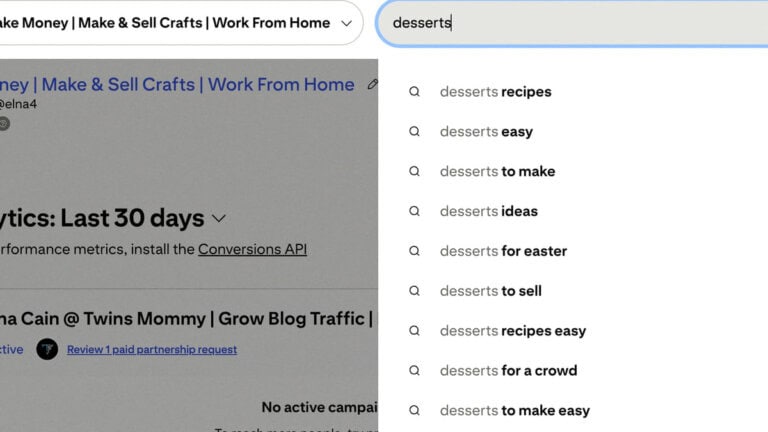
For example, if you are a food blog that does mostly desserts, you can use the drop down menu to get ideas like:
Easy desserts to make for your family. Find dessert recipes and ideas like appetizers and cozy soups and more.
6. Turn On Rich Pins
If you haven’t done this yet, this is one of those quiet upgrades that makes everything work better.
Rich Pins pull information from your website and attach it to your pins.
That includes your blog title and description.
So instead of Pinterest guessing what your pin is about, it gets the information directly from your site.
This helps Pinterest trust your content and show it to the right audience.
If you’re using WordPress, this is usually a quick setup.
Once it’s done, you don’t have to think about it again.
7. Create a Pin Style That Feels Like You
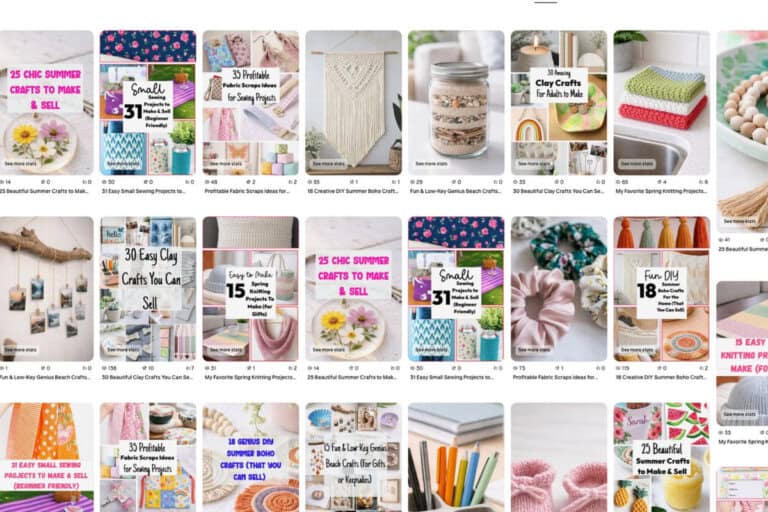
When I first started, I used whatever templates I could find.
And honestly, a lot of them looked the same.
That’s the problem.
Pinterest doesn’t reward generic designs.
If your pins blend in, they get ignored.
What I do now is create a few simple templates that match my brand.
That includes:
- Consistent colors
- Similar fonts
- A clean layout
Then I reuse those templates across my posts.
I like to use Canva to create my templates.
You don’t need anything complicated.
You just need something recognizable.
And if your pins aren’t getting clicks?
I switch things up.
I look at other pins in my niche, see what stands out, and adjust my templates.
That’s part of the process.
8. Focus on Consistency, Not Volume
This is something I’ve been paying attention to more in 2026.
You don’t need to overwhelm yourself with pinning.
I’ve seen bloggers post one pin per blog post and still get traffic.
I’ve also seen bloggers post multiple pins and grow faster.
So what matters most?
Consistency.
You need a system you can stick to.
Here’s what I do:
- Create 4–6 pin templates
- Upload blog posts into my design tool
- Generate multiple pin variations
- Schedule them out for the month
- Watch which designs get clicks
If you’re just starting, aim for around 10 pins a day.
As you grow, you can increase that.
But don’t chase volume at the expense of consistency.
That’s where most people burn out.
For More Pinning Help
If you still need more help with optimizing your entire Pinterest profile make sure to grab my updated eBook 15 Genius Pinterest Secrets.
Your Pinterest Profile
There ya go!
I hope these tips help you with your Pinterest profile.
Let me know in the comments below if you need help with your Pinterest profile. I can do a Pin Audit for my YouTube channel!
Just post your profile link below or email it to me!


Leave a Reply